
To make an appointment from the admin panel, go to “Appointments” on the top panel of WordPress and then select the desired day from the calendar. On the selected day, choose the desired time slot and press the “NEW APPOINTMENT” button.

Next, a window will open with the new appointment form, where you need to enter the appointment information.
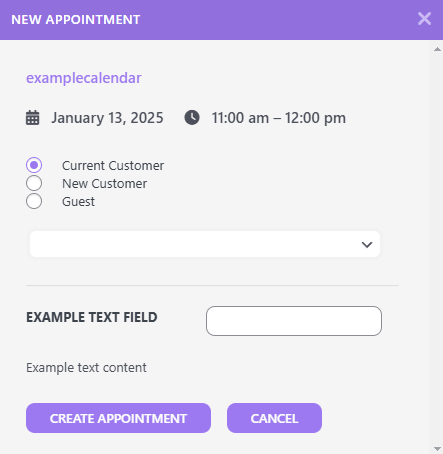
When entering the appointment details, you have three options for the person making the appointment:
- Current Customer – select a user from the list who already has an account on the site.
- New Customer – enter the first name, last name, email address, and password for the new user.
- Guest – enter the first name, last name, and email address of the person booking the appointment.
If there are additional fields added to the appointment form in our calendar, you will also have the option to fill out these fields in this window.

After entering all the appointment information, press the “CREATE APPOINTMENT” button to create a new appointment.