
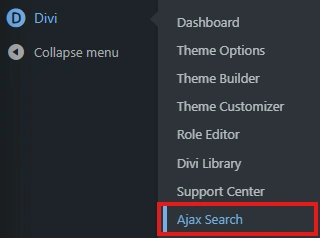
To access the plugin settings, select Divi from the left admin panel, and then from the expanded panel, choose the “Ajax Search” option.
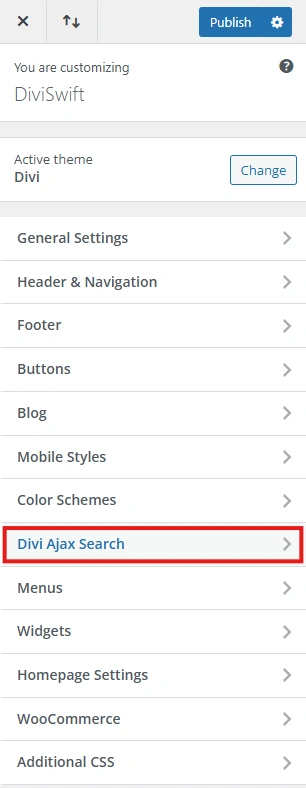
Next, in the editing panel, select the “Divi Ajax Search” option.
Ajax Search options #
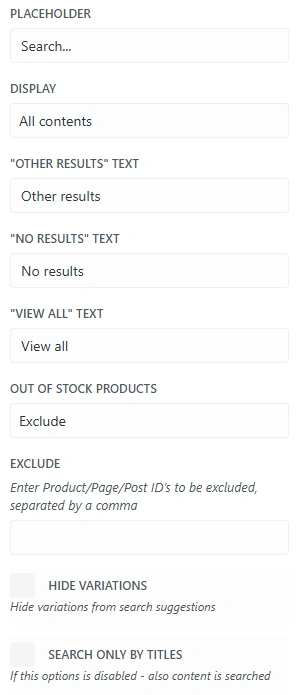
Placeholder #
Text displayed before starting to type the name of the item being searched for
Display #
- all contents – search works for all elements on the site, such as subpages
- just products – search works only for products listed in the shop
Other Results text #
In this option, you can change the text displayed in the “Other results” section.
No Results text #
In this option, you can change the text displayed when no items are found.
View All text #
In this option, you can change the text displayed for the “view all” option.
Out of stock products #
This option allows you to decide whether out-of-stock products should be displayed in the search results.
- Exclude – out-of-stock products will not appear in the search results
- Include – out-of-stock products will appear in the search results
Exclude #
This option allows you to exclude selected elements from the search results. To do this, you need to enter the product/post/page ID separated by comma.
Hide variations #
This option allows you to hide product variants from the search results.
Search only by titles #
This option allows you to decide whether the search should be conducted only through titles or through titles and all content.
Customization #
You can customize the Divi Ajax Sidebar Cart as you wish. Customization options include:
- Border colour
- Background colour
- Highlighted background colour
- View all button colour
- View all button text colour
- View all highlighted button colour
- View all highlighted button text colour
- Text colour