
To access the plugin settings, select Divi from the left admin panel, and then from the expanded panel, choose the “Ajax Sidebar Cart” option.
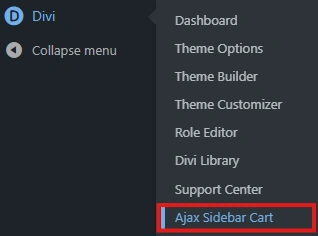
Next, in the editing panel, select the “Divi Ajax Sidebar Cart” option.

Shopping Cart Options #
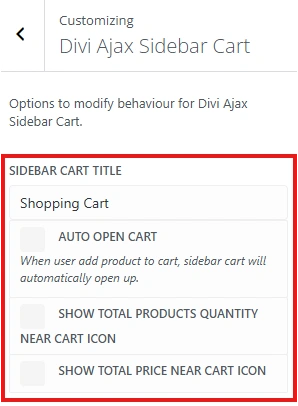
Auto open cart #
Allows you to decide whether the cart panel should open automatically each time a user adds a product to the cart.
Show total products quantity near cart icon #
When this option is selected, the quantity of products in the cart will be displayed next to the cart icon on the navigation bar.

Show total price near cart icon #
When this option is selected, the total value of the products in the cart will be displayed next to the cart icon on the navigation bar.

Customization #
You can customize the Divi Ajax Sidebar Cart as you wish. Customization options include:
- Background colour
- Text colour
- Accent hovered colour
- Button text colour
- Button hovered text colour
- Button background colour
- Button hovered background colour
- Button border radius (in px)
- Cart icon colour
- Cart hovered icon colour
- Cart icon size
- Text size for icon quantity and price
- Cart separator lines colour
- Close button text colour
- Close button hovered text colour
- Close button background colour
- Close button hovered background colour